|
|
楼主 |
发表于 2026-10-21 12:18:49
|
显示全部楼层
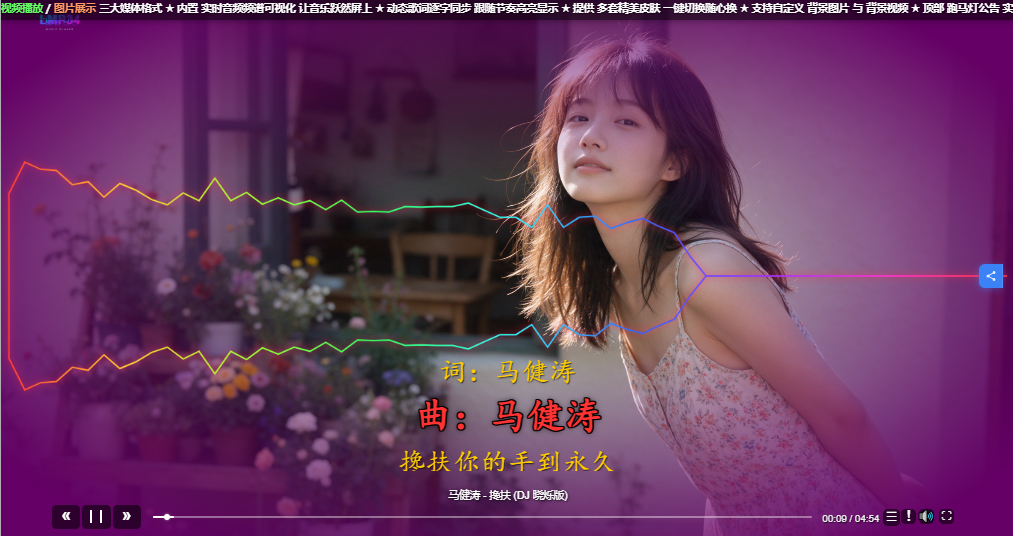
皮肤就3个文件 按钮用CSS伪元素徽章 简化了多余的文件 三个文件放在同一个文件夹里 播放器自动扫描这三个 网盘 你问 水芙蓉 我基本没管 她可开通管理网盘
skin.css
- html, body { margin: 0; padding: 0; width: 100%; height: 100%; overflow: hidden; background: transparent; }
- #lmp34-player { position: fixed; top: 0; left: 0; transform: none !important; width: 100vw; height: 100vh; overflow: hidden; background: transparent; }
- .lmp-window { position: absolute; box-sizing: border-box; overflow: hidden; }
- .lmp-window-media, .lmp-window-lrc, .lmp-window-console { background: transparent !important; border: none !important; }
- .lmp-window-media { z-index: 1; }
- .lmp-window-lrc { z-index: 5; }
- .lmp-window-console { z-index: 10; overflow: visible; }
- .lmp-window-list, .lmp-window-option { z-index: 20; }
- .lmp-video-container { position: relative; width: 100% !important; height: 100% !important; overflow: hidden !important; background: transparent !important; }
- .lmp-video-container video { width: 100% !important; height: 100% !important; object-fit: cover !important; display: block !important; background: transparent !important; }
- .lmp-cover { display: none !important; }
- .lmp-spectrum { position: absolute; top: 0; left: 0; width: 100%; height: 100%; pointer-events: none; }
- /* ================= 控制台按钮 ================= */
- .lmp-btn {
- display: flex !important; align-items: center !important; justify-content: center !important;
- background: rgba(0,0,0,0.55) !important;
- border: none !important;
- border-radius: 6px !important;
- color: #fff; cursor: pointer; user-select: none;
- transition: background 0.15s, filter 0.15s;
- padding: 0 !important; margin: 0 !important;
- font-size: 14px;
- line-height: 1;
- }
- .lmp-btn:hover { background: rgba(0,0,0,0.8) !important; filter: brightness(1.2); }
- .lmp-btn:active { filter: brightness(0.85); }
- .lmp-bt_prev::before { content: "«"; font-size: 1.6em; font-weight: bold; line-height: 1; }
- .lmp-bt_next::before { content: "»"; font-size: 1.6em; font-weight: bold; line-height: 1; }
- .lmp-bt_play::before {
- content: ""; width: 0; height: 0;
- border-top: 0.65em solid transparent;
- border-bottom: 0.65em solid transparent;
- border-left: 0.8em solid #fff;
- margin-left: 0.15em;
- }
- .lmp-bt_play[data-playing="1"]::before {
- width: 0.7em; height: 1.15em;
- border: none;
- border-left: 0.22em solid #fff;
- border-right: 0.22em solid #fff;
- margin: 0;
- }
- .lmp-bt_mute::before {
- content: "🔊";
- font-size: 1.3em;
- line-height: 1;
- }
- .lmp-bt_mute[data-muted="1"]::before,
- .lmp-bt_mute.lmp-muted::before {
- content: "🔇";
- }
- .lmp-bt_mute::after, .lmp-bt-mute-slash { display: none !important; }
- .lmp-volume { display: none !important; }
- .lmp-bt_list::before { content: "☰"; font-size: 1.2em; }
- .lmp-bt_option::before { content: "!"; font-size: 1.4em; font-weight: bold; }
- .lmp-bt_fullscreen::before { content: "⛶"; font-size: 1.2em; }
- /* ================= 标题 ================= */
- .lmp-title {
- color: #ffffff;
- font-family: Arial, sans-serif;
- white-space: nowrap;
- overflow: hidden;
- text-overflow: ellipsis;
- text-shadow: 1px 1px 3px rgba(0,0,0,0.9);
- }
- /* ================= 时间 ================= */
- .lmp-time {
- color: #eeeeee;
- font-family: Arial, sans-serif;
- text-shadow: 1px 1px 2px rgba(0,0,0,0.8);
- }
- /* ================= 进度条 ================= */
- .lmp-progress {
- position: relative !important;
- background: rgba(255,255,255,0.4) !important;
- border-radius: 2px;
- cursor: pointer;
- overflow: visible;
- }
- .lmp-progress::before {
- content: ""; position: absolute; top: 0; left: 0; height: 100%;
- width: var(--progress, 0%); border-radius: 2px;
- background: #ffffff !important;
- pointer-events: none;
- }
- .lmp-progress-thumb {
- position: absolute !important;
- width: 8px !important; height: 8px !important;
- background: #ffffff !important;
- border-radius: 50%;
- top: 50% !important;
- transform: translate(-50%, -50%);
- box-shadow: 0 0 4px rgba(255,255,255,0.8);
- cursor: grab;
- z-index: 2;
- }
- .lmp-progress-thumb:hover { transform: translate(-50%, -50%) scale(1.4); }
- /* ================= 列表 ================= */
- .lmp-window-list {
- background: rgba(0, 0, 0, 0.4) !important;
- border: none !important; backdrop-filter: blur(3px);
- border-radius: 6px;
- }
- .lmp-tree { background: transparent !important; }
- .lmp-tree-item {
- color: #ffffff;
- font-family: "KaiTi", "楷体", "STKaiti", serif;
- padding: 8px 16px;
- cursor: pointer;
- border-bottom: none;
- transition: color 0.1s;
- text-shadow: 1px 1px 2px rgba(0,0,0,0.8);
- }
- .lmp-tree-item:hover { background: transparent; color: #ffcc00; }
- .lmp-tree-item.lmp-active { background: transparent; font-weight: 700; color: #ff0000; }
- .lmp-search {
- background-color: #111111 !important;
- background-image: none !important;
- border: 1px solid #555555 !important;
- border-radius: 4px;
- color: #ffffff !important;
- padding: 0 8px;
- outline: none;
- }
- .lmp-search:focus { border-color: rgba(120,180,255,0.8) !important; }
- .lmp-bt_close {
- background: transparent !important; border: none !important;
- color: #ff0000 !important; z-index: 30;
- }
- .lmp-bt_close::before { content: "✕"; }
- /* ================= 设置 ================= */
- .lmp-window-option {
- background: rgba(0, 0, 0, 0.5) !important;
- backdrop-filter: blur(5px);
- border-radius: 4px;
- border: 1px solid rgba(255,255,255,0.2) !important;
- box-shadow: 0 4px 12px rgba(0,0,0,0.5);
- }
- /* ================= 歌词 ================= */
- .lmp-lrc-text { position: absolute; overflow: hidden; width: 100%; height: 100%; text-align: center; }
- .lmp-lrc-line {
- display: block; text-align: center; padding: 2px 0; line-height: 1.4;
- font-family: "KaiTi", "楷体", "STKaiti", serif;
- color: #ffcc00;
- font-size: var(--lrc-size-normal, 36px);
- transition: color 0.3s, font-size 0.3s;
- text-shadow: 1px 1px 2px rgba(0,0,0,0.8);
- }
- .lmp-lrc-line.lmp-active {
- font-weight: bold;
- font-size: var(--lrc-size, 50px);
- color: #ff3333 !important;
- text-shadow:
- -1.5px -1.5px 0 #000, 1.5px -1.5px 0 #000,
- -1.5px 1.5px 0 #000, 1.5px 1.5px 0 #000,
- -1.5px 0 0 #000, 1.5px 0 0 #000,
- 0 -1.5px 0 #000, 0 1.5px 0 #000,
- 0 0 8px rgba(0,0,0,0.8);
- }
- /* ================= 音量 ================= */
- .lmp-volume { background: transparent; cursor: pointer; opacity: 0; transition: opacity 0.2s; }
- .lmp-bt_mute:hover + .lmp-volume { opacity: 1; }
- .lmp-volume-thumb { width: 10px !important; height: 10px !important; background: #fff; border-radius: 50%; box-shadow: 0 0 4px #fff; }
- .lmp-tree {
- scrollbar-width: thin;
- scrollbar-color: rgba(255,255,255,0.3) transparent;
- }
- .lmp-tree::-webkit-scrollbar { width: 8px; }
- .lmp-tree::-webkit-scrollbar-track { background: transparent; }
- .lmp-tree::-webkit-scrollbar-thumb {
- background: rgba(255,255,255,0.3);
- border-radius: 4px;
- }
- .lmp-tree::-webkit-scrollbar-thumb:hover { background: rgba(255,255,255,0.5); }
- var LMP34 = LMP34 || {};
- LMP34.skinHooks = (function () {
- var centerPlayEl = null;
- var resizeBound = false;
- function applyXYWH(el, pos) {
- el.style.left = pos.x + 'px';
- el.style.top = pos.y + 'px';
- el.style.width = pos.w + 'px';
- el.style.height = pos.h + 'px';
- }
- function initCenterPlay(container) {
- return;
- }
- function setCenterPlayVisible(visible) {
- return;
- }
- function buildLrcText(child, parentEl, winName, elements) {
- var a = child.attrs;
- if (child.tag === 'kmc') {
- elements.lrcKmc = a;
- if (elements.lrcText && a.size) {
- var s = parseFloat(a.size);
- if (s > 0) {
- elements.lrcText.style.setProperty('--lrc-size', s + 'px');
- elements.lrcText.style.setProperty('--lrc-size-normal', (s * 0.73) + 'px');
- }
- }
- return null;
- }
- var txt = document.createElement('div');
- txt.className = 'lmp-lrc-text';
- txt.style.cssText = 'position:absolute;overflow:hidden;text-align:center;width:100%;height:100%;';
- var baseSize = parseFloat(a.size) || 50;
- txt.style.setProperty('--lrc-size', baseSize + 'px');
- txt.style.setProperty('--lrc-size-normal', (baseSize * 0.73) + 'px');
- if (a.font) txt.style.fontFamily = a.font;
-
- parentEl.appendChild(txt);
- elements.lrcText = txt;
- return txt;
- }
- function buildVideo(child, parentEl, winName, elements) {
- var video = document.createElement('div');
- video.className = 'lmp-video-container';
- video.style.cssText = 'overflow:hidden;position:relative;width:100%;height:100%;';
- parentEl.appendChild(video);
- elements.videoContainer = video;
- var spec = document.createElement('canvas');
- spec.className = 'lmp-spectrum';
- spec.style.cssText = 'position:absolute;pointer-events:none;z-index:3;';
- video.appendChild(spec);
- elements.spectrumCanvas = spec;
- return video;
- }
- function loadLrc(lrcSrc, elements, currentItem) {
- if (!elements || !elements.lrcText) return;
- elements.lrcText.innerHTML = '';
- function fallback() {
- var name = currentItem && (currentItem.title || currentItem.label);
- if (!name) return;
- var line = document.createElement('div');
- line.className = 'lmp-lrc-line lmp-active';
- line.textContent = name;
- elements.lrcText.appendChild(line);
- }
- if (!lrcSrc) { fallback(); return; }
- var url = lrcSrc;
- var anchor = document.createElement('a');
- anchor.href = lrcSrc;
- if (anchor.origin !== window.location.origin) url = 'proxy.php?url=' + encodeURIComponent(lrcSrc);
- var xhr = new XMLHttpRequest();
- xhr.open('GET', url, true);
- xhr.onreadystatechange = function () {
- if (xhr.readyState !== 4) return;
- if (xhr.status === 200 || xhr.status === 0) {
- var lines = LMP34.api.parseLrc(xhr.responseText);
- if (lines && lines.length) LMP34.hooks.doAction(LMP34.hooks.NAMES.LRC_RENDER_LINES, lines, elements);
- else fallback();
- } else { fallback(); }
- };
- xhr.send();
- }
- function renderLrcLines(lines, elements) {
- if (!elements || !elements.lrcText) return;
- elements.lrcText.innerHTML = '';
- for (var i = 0; i < lines.length; i++) {
- var line = document.createElement('div');
- line.className = 'lmp-lrc-line';
- line.textContent = lines[i].text;
- line.dataset.time = lines[i].time;
- elements.lrcText.appendChild(line);
- }
- elements.lrcText.scrollTop = 0;
- }
- function updateLrc(ct, elements) {
- if (!elements || !elements.lrcText) return;
- var lines = elements.lrcText.querySelectorAll('.lmp-lrc-line');
- if (!lines.length) return;
- var activeIdx = -1;
- for (var i = lines.length - 1; i >= 0; i--) {
- if (ct >= (parseFloat(lines[i].dataset.time) || 0)) { activeIdx = i; break; }
- }
- for (var j = 0; j < lines.length; j++) {
- if (j === activeIdx) {
- lines[j].classList.add('lmp-active');
- } else {
- lines[j].classList.remove('lmp-active');
- }
- }
- if (activeIdx >= 0) {
- var el = lines[activeIdx];
- elements.lrcText.scrollTop = el.offsetTop - elements.lrcText.clientHeight / 2 + el.offsetHeight / 2;
- }
- }
- function relayoutWindowChildren(winEl) {
- if (!winEl) return;
- var cw = winEl.clientWidth, ch = winEl.clientHeight;
- for (var i = 0; i < winEl.children.length; i++) {
- var xywh = winEl.children[i].dataset.xywh;
- if (xywh) {
- applyXYWH(winEl.children[i], LMP34.api.parseXYWH(xywh, cw, ch));
- if (winEl.children[i].children.length) relayoutWindowChildren(winEl.children[i]);
- }
- }
- }
- function applyFullscreenLayout(ctx) {
- var container = ctx && ctx.container, windows = ctx && ctx.windows;
- if (!container || !windows) return;
- initCenterPlay(container);
- var vw = window.innerWidth, vh = window.innerHeight;
- container.style.width = vw + 'px';
- container.style.height = vh + 'px';
- var zMap = { media: 1, lrc: 5, console: 10, list: 20, option: 20 };
- for (var name in windows) {
- var win = windows[name];
- if (!win || !win.dataset.xywh) continue;
- applyXYWH(win, LMP34.api.parseXYWH(win.dataset.xywh, vw, vh));
- if (zMap[name]) win.style.zIndex = zMap[name];
- relayoutWindowChildren(win);
- }
- }
- function onLayout(ctx) {
- applyFullscreenLayout(ctx);
- if (resizeBound) return;
- resizeBound = true;
- var timer;
- window.addEventListener('resize', function () {
- clearTimeout(timer);
- timer = setTimeout(function () { applyFullscreenLayout(ctx); }, 120);
- });
- }
- return {
- buildLrcText: buildLrcText,
- buildVideo: buildVideo,
- loadLrc: loadLrc,
- renderLrcLines: renderLrcLines,
- updateLrc: updateLrc,
- onLayout: onLayout,
- onWindowToggle: function(n,h,ctx){ applyFullscreenLayout(ctx); },
- setCenterPlayVisible: setCenterPlayVisible
- };
- })();
- // 状态联动
- (function () {
- function ready(fn) { document.readyState !== 'loading' ? fn() : document.addEventListener('DOMContentLoaded', fn); }
- ready(function () {
- var hooks = LMP34.hooks;
- if (!hooks) return;
- function getElements() { return LMP34.view && LMP34.view.skin && LMP34.view.skin.getElements(); }
- function updateMuteIcon() {
- var el = getElements();
- if (el && el.bt_mute) {
- var m = LMP34.mediaEngine && LMP34.mediaEngine.getMuted && LMP34.mediaEngine.getMuted();
- el.bt_mute.setAttribute('data-muted', m ? '1' : '0');
- el.bt_mute.classList.toggle('lmp-muted', !!m);
- }
- }
- hooks.addAction(hooks.NAMES.MEDIA_STATE, function (s) {
- LMP34.skinHooks && LMP34.skinHooks.setCenterPlayVisible && LMP34.skinHooks.setCenterPlayVisible(s === 'paused' || s === 'stopped');
- updateMuteIcon();
- var type = LMP34.mediaEngine && LMP34.mediaEngine.getType && LMP34.mediaEngine.getType();
- var lrcWin = document.querySelector('.lmp-window-lrc');
- if (lrcWin) {
- lrcWin.style.display = (type === 'video' && s !== 'stopped') ? 'none' : '';
- }
- }, 10, 'lmp34-fuke');
- hooks.addAction(hooks.NAMES.MEDIA_TIME_UPDATE, function (ct, dur) {
- var el = getElements();
- if (el && el.progress) {
- el.progress.style.setProperty('--progress', (dur > 0 ? ct / dur * 100 : 0) + '%');
- }
- }, 10, 'lmp34-fuke');
- function bindMuteObserver() {
- var el = getElements();
- if (!el || !el.bt_mute) { setTimeout(bindMuteObserver, 300); return; }
- updateMuteIcon();
- if (window.MutationObserver) {
- var mo = new MutationObserver(function () { updateMuteIcon(); });
- mo.observe(el.bt_mute, { attributes: true, attributeFilter: ['class', 'style'] });
- }
- el.bt_mute.addEventListener('click', function () {
- setTimeout(updateMuteIcon, 50);
- setTimeout(updateMuteIcon, 200);
- });
- }
- bindMuteObserver();
- });
- })();
- <skin name="LMP34-澄影" version="4.0" author="亚伦影音工作室" email="1132765571@qq.com" url="https://bbs.cnzv.cc/?32" readme="透明背景,满屏视频,音画一体" preview="" mask_color="#000000" show_tips="0.5" context_menu="1">
- <media xywh="0, 0, 100P, 100P" src="" mask="" lock="1" display="1" group="A">
- <video xywh="0, 0, 100P, 100P" show_icon="0" show_buttons="0">
- <spectrum xywh="0, 60P, 100P, 40P" />
- </video>
- </media>
- <lrc xywh="0, 65P, 100P, 20P" src="" mask="" lock="1" display="1" group="A" shadow="">
- <text xywh="0, 0, 100P, 100P" align="center" font="KaiTi,楷体,STKaiti,serif" size="50" leading="0" color="#ffcc00, #ff3333" horizontal="0" max_scale="1" max_button="0">
- <kmc line_mode="0" time_preview="5000" time_sec3="8000" show_info="0" margin="0" size="50" bold="1" align="center, center" color="#ffcc00, #ff3333" />
- </text>
- </lrc>
- <console xywh="0, 30R, 100P, 60" src="" mask="" lock="1" display="1" group="A">
- <title xywh="0, 0, 100P, 20" align="center" font="Arial" size="14" color="#ffffff,#cccccc" bold="0" />
- <bt_prev xywh="5P, 22, 38, 32" src="" tips="上一个" />
- <bt_play xywh="8P, 22, 38, 32" src="" tips="播放,暂停" />
- <bt_next xywh="11P, 22, 38, 32" src="" tips="下一个" />
- <progress xywh="15P, 37, 65P, 3" thumb_src="" track_src="" tips="定位" />
- <time xywh="81P, 30, 110, 20" align="left" font="Arial" size="13" color="#eeeeee" />
- <bt_list xywh="87P, 28, 22, 22" src="" tips="打开列表,关闭列表" />
- <bt_option xywh="88.8P, 28, 20, 20" src="" tips="皮肤信息" />
- <bt_mute xywh="90.5P, 28, 20, 20" src="" tips="静音,打开声音" hover_volume="" />
- <volume xywh="90P, 50B, 5, 32" thumb_src="" track_src="" src="" tips="音量" />
- <bt_fullscreen xywh="92.5P, 28, 20, 20" src="" fullscreen_scale="1" fullscreen_max="video" tips="打开全屏,退出全屏" />
- </console>
- <list xywh="50R, 50, 520, 60B" src="" mask="" lock="1" display="0" group="A" fade="0">
- <tree xywh="10, 20, 510, 55B" align="left" font="KaiTi,楷体,STKaiti,serif" size="18" color="#ffffff, #ffffff" bold="0" show_delete="0" show_icon="1" />
- <search xywh="10, 20R, 490, 28" align="left" font="Arial" size="20" color="#ffffff, #aaaaaa" borderColor="#555555" backgroundColor="#111111" bold="0" value="搜索..." />
- <scrollbar thumb_src="" button_src="" track_src=""/>
- <icons bullet="" opened="" closed="" />
- <bt_close xywh="5R, 5, 22, 22" src="" tips="关闭列表" />
- </list>
- <option xywh="10R, 50, 260, 50B" src="" mask="" lock="1" display="0" group="A" fade="0">
- <pane xywh="0, 0, 100P, 100P" align="left" font="" size="12" color="#7a7a9a, #b0b0d0" />
- <scrollbar thumb_src="" button_src="" track_src=""/>
- <bt_close xywh="5R, 3, 15, 14" src="" tips="关闭设置" />
- </option>
- <languages>
- <msg id="state_playing">正在播放</msg>
- <msg id="state_paused">已暂停</msg>
- <msg id="menu_list">播放列表</msg>
- <msg id="menu_lrc">歌词</msg>
- <msg id="menu_option">选项</msg>
- </languages>
- </skin>
|
|
 |Archiver|小黑屋|纳兰音画网
( 蜀ICP备2021011087号-1 )






 窥视卡
 雷达卡


 发表于 2026-10-21 00:38:22
 提升卡
 置顶卡
 沉默卡
 喧嚣卡
 变色卡
 千斤顶
 照妖镜


 发表于 2026-10-21 07:38:07


 发表于